Rent Cloud Storage – Storage in Germany from €1.99
One storage for backups, project files and your community’s downloads. Reach it in the browser, as a network drive, via SFTP or S3 – and share files with a link.
- Plans
- 100 GB – 10 TB
- from 1 TB
- 1 ct per GB
- Term
- cancel monthly


Cloud Storage plans and prices
Every plan includes download traffic as large as its storage. All ways in – browser, network drive, SFTP and S3 – are always included.
StorageTrafficPrice per GBPrice
More traffic when you need it
If a contract month’s traffic is used up, nothing is charged afterwards: downloads continue at 50 Mbit/s. If you want full speed again right away, add extra traffic in your customer account.
- +1 TB
- €1.49 per month
- +2 TB
- €2.89 per month
- +5 TB
- €6.99 per month
- +10 TB
- €12.99 per month
- +1 TB one-off
- €1.99 for the current contract month
Bonus for Nexthosting customers
For every active game server, web hosting or VPS contract, your plan gets +10 GB extra, up to +50 GB. No request needed – the panel works it out itself.
Cancel monthly. You can switch to a larger plan any time in your customer account.
Flex – pay as you go, on request
For changing needs. Billed monthly, with a usage statement for every invoice.
- Base price
- €9.99 per month, with 1 TB storage and 1 TB traffic
- Storage beyond that
- €8.90 per TB-month
- Traffic beyond that
- €1.49 per TB
One storage, four ways in
You create a separate access key for every device and every program – with exactly the rights it needs. If a device gets lost, you revoke just that one key.
Browser
storage.nexthosting.netUpload, organise, view and share files – no program needed.
any current browser
Network drive (WebDAV)
dav.nexthosting.netThe storage appears like a hard drive in Explorer or Finder.
Windows, macOS, Linux, rclone mount
SFTP
sftp.nexthosting.net : 22Transfer files and run scripts, encrypted.
WinSCP, Cyberduck, FileZilla, sftp
S3
s3.nexthosting.netFor backups, programs and websites that speak S3.
aws-cli, rclone, restic, Synology, UpdraftPlus
Tested with aws-cli, rclone and restic. Works with all common S3, SFTP and WebDAV programs, e.g. WinSCP, Cyberduck, FileZilla, Synology Hyper Backup and UpdraftPlus.
Connect without a manual
In the panel you pick the way in and your operating system. You get exactly the steps you need – and a ready-made file for your program: rclone, WinSCP, Cyberduck or a network drive on Windows with a double click.
The password is shown exactly once. We do not store it in readable form.


Files in the browser: drag, drop, done
- Whole folders including subfolders, dragged straight in
- Large files upload in parts and resume where they stopped after an interruption
- Checked first: if it no longer fits into your storage, the panel tells you before the upload
- Preview for images, videos, text and PDF, download several files as a ZIP
- Search, move, rename – with the keyboard like in a file manager: arrows, Shift, Del, F2


Share without giving everything away
A link for a file or a folder – or members who work along in a bucket. All in one place, with downloads and traffic per link. Storage and traffic always count for the owner.


Share links
With an expiry date, an optional password, a download limit or as a one-time link that disappears after the first download. Whoever opens the link needs no account.
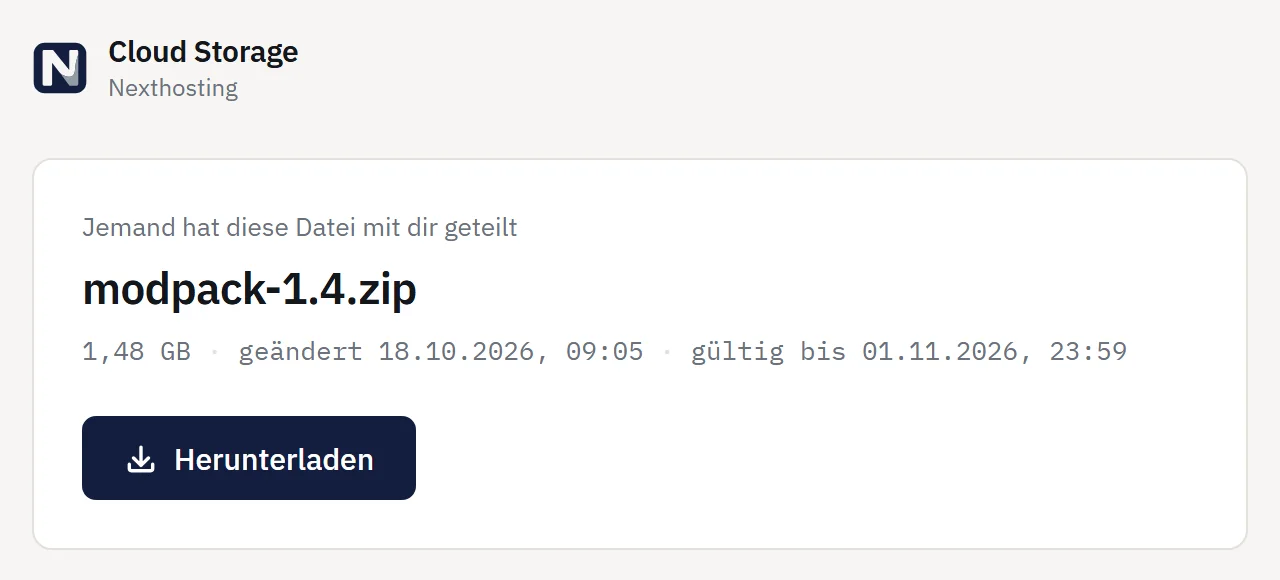
What recipients see
A calm page with file name, size and validity – and a button to download. Just right for your Minecraft server’s resource pack or the map for your community.
Members
Invite other Nexthosting customers into a bucket – for example your server’s team. Roles: read, read and write, or manage. Invited members need no plan of their own. Removing someone takes one click.
Your server backups in one place
With a Cloud Storage plan you see the backups of your game servers and VPS at Nexthosting in the same panel. You download game server backups there; VPS backups you create, restore or schedule. The backups are included in the price of your servers and do not count towards your storage.


Location and security
Data centre in Germany
Your files are stored in Germany.
Encrypted connections
Browser, S3 and WebDAV run over HTTPS; SFTP is encrypted by design.
Access keys with their own rights
Read, write, delete per bucket or folder – if you like, only from certain IP addresses and with an expiry date.
Links that expire
Share links expire, count downloads and can be switched off at any time.
Frequently asked questions about Cloud Storage
How much does Cloud Storage cost?
Plans cost from €1.99 per month for 100 GB up to €99.99 for 10 TB. From 1 TB that is 1 cent per gigabyte per month. You pay monthly and can cancel monthly.
How much download traffic is included?
As much as your plan is large – so with 1 TB, 1 TB per contract month, bonus storage included. Uploads do not count. If you need more, nothing is charged: downloads continue at a throttled 50 Mbit/s until the next contract month. If you want full speed again right away, add extra traffic: permanently from +1 TB for €1.49 per month, or one-off +1 TB for the current contract month for €1.99.
Which programs can I use?
Anything that speaks S3, SFTP or WebDAV. Tested with aws-cli, rclone and restic. Works with all common S3, SFTP and WebDAV programs, e.g. WinSCP, Cyberduck, FileZilla, Synology Hyper Backup and UpdraftPlus. In the panel, under “Connect”, you pick your program and operating system and get the matching steps and a ready-made connection file.
Can I mount the storage as a network drive?
Yes, via WebDAV on Windows, macOS and Linux. Windows handles files up to 50 MB this way; for larger files we recommend rclone or RaiDrive – the instructions are in the panel.
How do I get bonus storage?
For every active game server, web hosting or VPS contract at Nexthosting, your plan gets 10 GB extra, up to 50 GB. The bonus is calculated automatically.
What happens when the storage is full?
Then no new files can be uploaded; viewing, downloading and deleting still work. If you like, the panel notifies you at 80 % and 95 % by email or Discord. You can switch to a larger plan any time in your customer account.
Can I share files with others?
Yes, in two ways. Share links for files and folders – with an expiry date, an optional password, a download limit or as a one-time link. Or you invite other Nexthosting customers into a bucket as members, with the role read, read and write, or manage. Storage and traffic still count for you.
Are my game server and VPS backups included?
With a Cloud Storage plan you see the backups of your game servers and VPS at Nexthosting in the same panel. You can download game server backups there and create, restore and schedule VPS backups. They do not count towards your storage.
Are my files protected against failures?
Yes. Every file is split into parts and stored spread across several servers in the data centre – even if up to three storage servers fail at the same time, your data stays complete. Power and network are redundant. What there is not: an additional copy in a second data centre, or older versions of deleted files – whatever you delete or overwrite is gone. For very important data we therefore recommend an additional backup in another place.
What happens if an invoice stays unpaid?
Two days after the due date the storage is locked completely: no uploads, no downloads, no share links. As soon as the payment arrives, everything is unlocked at once. If the invoice stays unpaid, the contract ends after ten days and the files are then deleted. We remind you by email beforehand.
What happens when I cancel?
You can cancel monthly. At the end of the term all files are deleted – we remind you by email 7 days and 1 day before, so you can download them in time.
Where are the servers?
In a data centre in Germany. Connections to the storage are encrypted (HTTPS and SFTP).
What is Cloud Storage Flex?
A pay-as-you-go plan: €9.99 per month with 1 TB storage and 1 TB traffic, beyond that €8.90 per TB-month of storage and €1.49 per TB of traffic. Every invoice comes with a usage statement showing the values per day, and a spending limit protects you from surprises. We activate Flex on request.
From €1.99 per month
100 GB to 10 TB, cancel monthly, data centre in Germany.